Async JavaScript: Promises, Callbacks, and Async/Await
JavaScript is one of those languages that can feel wonderfully simple at first and then surprisingly deep once you start building real applications. Writing let x = 10 or a small function is easy. The challenge begins when your code must wait for something: a response from an API, a file read, a database query, a timer, a user event, or a background task that takes time to finish.
That is where asynchronous JavaScript comes in.
Async JavaScript is the foundation of modern web apps, Node.js servers, mobile backends, automation scripts, and nearly every place where JavaScript needs to do more than one thing at a time without freezing the program. In the beginning, developers used callbacks. Then promises arrived and made async control flow more manageable. Finally, async/await gave JavaScript a cleaner way to write asynchronous code that looks and feels almost like synchronous code.
This article is a complete guide to understanding all three styles. We will explore callbacks, promises, and async/await in depth, compare them side by side, look at error handling, chaining, parallel execution, common mistakes, and best practices, and build a mental model that makes asynchronous code feel much easier to reason about.
What asynchronous JavaScript really means
Synchronous code runs line by line. Each line must finish before the next one starts. That is easy to read, but it can become a problem when a task takes time.
Imagine this:
console.log("Start");

const result = expensiveOperation(); // blocks everything

console.log("End");
If expensiveOperation() takes a long time, the entire program waits. In a browser, that could make the page feel frozen. In Node.js, that could slow down request handling and reduce throughput.
Asynchronous code solves this by letting JavaScript begin a task and then move on while the task finishes in the background. When the task is done, JavaScript comes back and continues with the result.
A simple async example:
console.log("Start");

setTimeout(() => {
  console.log("Inside timeout");
}, 2000);

console.log("End");
Output:
Start
End
Inside timeout
The important idea is this: JavaScript does not always wait for a task to complete before continuing. Instead, it can schedule the task, keep the program responsive, and handle the result later.
Why asynchronous code matters
Without async behavior, modern applications would feel slow and brittle. Consider a few common tasks:
Task | Why async helps |
|---|---|
Fetching data from an API | Network requests take time |
Reading files | Disk access is slower than memory access |
Database queries | Queries may take milliseconds or seconds |
Waiting for user events | Users decide when to click or type |
Timers and polling | Actions happen in the future |
Streaming data | Data arrives in chunks over time |
Async JavaScript is not just a convenience. It is part of how JavaScript remains efficient and interactive.
The event loop: the engine behind async behavior
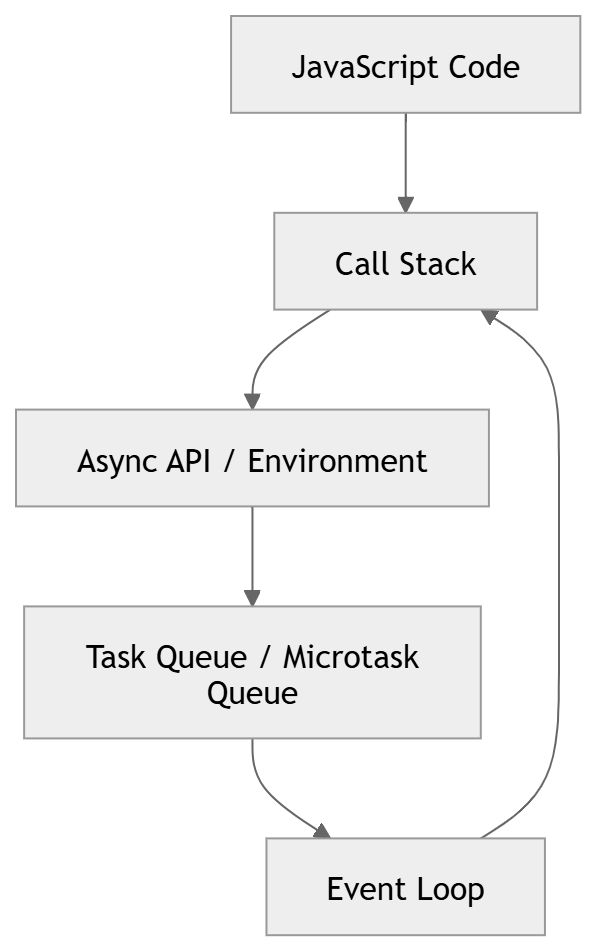
To understand callbacks, promises, and async/await, you need the event loop. The event loop is the mechanism that lets JavaScript handle tasks in the right order without blocking the main thread.
Here is the basic idea:
JavaScript runs code on a call stack.
When something asynchronous happens, it is handed off to the environment.
When the async task completes, its callback or continuation is placed in a queue.
The event loop checks whether the stack is empty.
If the stack is free, the queued task gets executed.
Schema diagram: event loop overview
Think of JavaScript as a chef in a kitchen. The chef can start boiling pasta, then chop vegetables while the water heats. When the pasta is ready, a timer rings and the chef returns to it. The event loop is what helps the chef know when to return.
Callbacks: the original async pattern
Before promises and async/await, callbacks were the main way to handle asynchronous logic in JavaScript.
A callback is simply a function passed into another function, to be called later.
Basic callback example
function fetchData(callback) {
  setTimeout(() => {
    const data = { name: "Hassan", role: "Developer" };
    callback(data);
  }, 1000);
}

fetchData((result) => {
  console.log("Received:", result);
});
Here, fetchData does not return the data immediately. Instead, it accepts a callback function, then calls that function later when the data is ready.
Why callbacks were useful
Callbacks were a big step forward because they allowed JavaScript to:
keep working while waiting for a task,
separate setup from completion handling,
support event-driven programming,
work with early browser APIs and Node.js APIs.
A more realistic callback example
function loadUser(id, callback) {
  setTimeout(() => {
    const user = {
      id,
      name: "Amina"
    };
    callback(null, user);
  }, 1000);
}

loadUser(1, (error, user) => {
  if (error) {
    console.error(error);
    return;
  }

  console.log("User:", user);
});
This style often uses an error-first pattern, where the first argument is an error and the second is the result.
Error-first callbacks
In Node.js, callback APIs often follow the convention:
callback(error, result)
If there is no error, error is null.
Example
function getProfile(callback) {
  setTimeout(() => {
    const success = true;

    if (!success) {
      callback(new Error("Profile not found"), null);
      return;
    }

    callback(null, { id: 7, name: "Sara" });
  }, 500);
}

getProfile((err, profile) => {
  if (err) {
    console.error("Failed:", err.message);
    return;
  }

  console.log("Profile:", profile);
});
This pattern works, but as code grows, it can become messy.
Callback hell
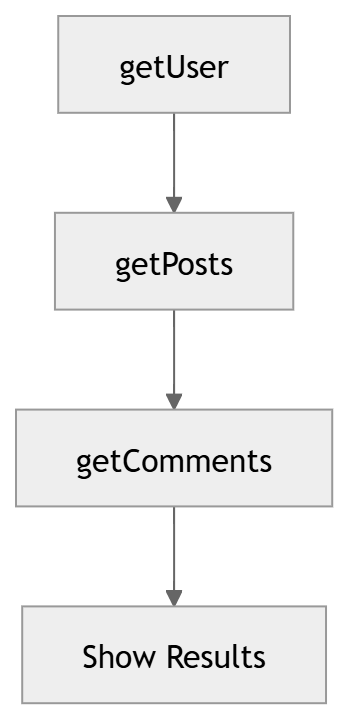
The biggest issue with callbacks is nesting. When one async operation depends on another, callbacks can start stacking deeply.
Example of nested callbacks
getUser(1, (err, user) => {
  if (err) {
    console.error(err);
    return;
  }

  getPosts(user.id, (err, posts) => {
    if (err) {
      console.error(err);
      return;
    }

    getComments(posts[0].id, (err, comments) => {
      if (err) {
        console.error(err);
        return;
      }

      console.log(comments);
    });
  });
});
This is often called callback hell or pyramid of doom.
Schema diagram: callback nesting
The problem is not only visual. Deeply nested callbacks are harder to:
read,
maintain,
test,
reuse,
and debug.
Common callback problems
Problem | Result |
|---|---|
Deep nesting | Harder readability |
Repeated error checks | More boilerplate |
Inversion of control | Less direct flow |
Multiple callback calls | Bug-prone APIs |
Inconsistent conventions | Confusion between libraries |
Why callbacks still matter
Even though promises and async/await are more common today, callbacks are still relevant.
They appear in:
event handlers,
DOM listeners,
older libraries,
Node.js APIs,
custom utility functions,
performance-sensitive low-level code.
Example of an event callback
button.addEventListener("click", () => {
  console.log("Button clicked");
});
This is still a callback. The difference is that it is used for an event rather than a one-time async result.
Promises: a cleaner async model
Promises were introduced to make asynchronous code easier to manage.
A promise is an object that represents a value that may be available now, later, or never.
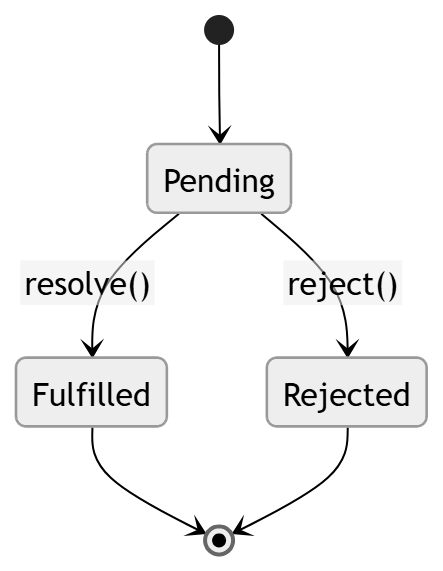
A promise can be in one of three states:
State | Meaning |
|---|---|
Pending | The async task is still running |
Fulfilled | The task completed successfully |
Rejected | The task failed |
Basic promise example
const promise = new Promise((resolve, reject) => {
  const success = true;

  setTimeout(() => {
    if (success) {
      resolve("Data loaded");
    } else {
      reject("Something went wrong");
    }
  }, 1000);
});

promise
  .then((value) => {
    console.log(value);
  })
  .catch((error) => {
    console.error(error);
  });
A promise gives you a structured way to handle success and failure without deeply nested callbacks.
Schema diagram: promise states
Promise chaining
One of the strongest features of promises is chaining.
Each .then() can return a new value or another promise, which lets you create a clean sequence of async operations.
Example
fetchUser()
  .then((user) => {
    return fetchOrders(user.id);
  })
  .then((orders) => {
    return fetchOrderDetails(orders[0].id);
  })
  .then((details) => {
    console.log(details);
  })
  .catch((error) => {
    console.error("Error:", error);
  });
This is already much cleaner than nested callbacks. Each step is flat, and the error handling can live in one .catch() block.
Promise chain flow

Promise basics: resolve, reject, then, catch, finally
Promises have a few core methods that every JavaScript developer should know.
then()
Runs when the promise is fulfilled.
getData().then((data) => {
  console.log(data);
});
catch()
Runs when the promise is rejected.
getData().catch((error) => {
  console.error(error);
});
finally()
Runs whether the promise succeeds or fails.
getData()
  .then((data) => console.log(data))
  .catch((error) => console.error(error))
  .finally(() => console.log("Done"));
Table: promise methods
Method | Purpose | Returns |
|---|---|---|
| Handle success | A new promise |
| Handle errors | A new promise |
| Cleanup after completion | A new promise |
Promise creation vs promise consumption
It helps to separate these two ideas:
Concept | Meaning |
|---|---|
Promise creation | Writing code that returns a promise |
Promise consumption | Using |
Creating a promise
function wait(ms) {
  return new Promise((resolve) => {
    setTimeout(resolve, ms);
  });
}
Consuming a promise
wait(1000).then(() => {
  console.log("1 second passed");
});
This split is important because many built-in APIs already return promises, and your job is often just to consume them correctly.
Promises and the microtask queue
Promises are not just another callback style. They have special scheduling behavior.
When a promise resolves, its .then() and .catch() handlers go into the microtask queue, which generally runs before the macrotask queue, such as timers.
Example
console.log("A");

setTimeout(() => {
  console.log("B");
}, 0);

Promise.resolve().then(() => {
  console.log("C");
});

console.log("D");
Output:
A
D
C
B
This is one of the reasons promise behavior feels different from plain callbacks. The microtask queue gives promises a very specific execution priority.
Promise methods you should know
JavaScript gives us several utility methods for working with multiple promises.
Promise.all()
Waits for all promises to fulfill. If one fails, the whole result fails.
Promise.all([fetchUser(), fetchPosts(), fetchSettings()])
  .then(([user, posts, settings]) => {
    console.log(user, posts, settings);
  })
  .catch((error) => {
    console.error("One request failed:", error);
  });
Use this when all operations are required for success.
Promise.allSettled()
Waits for all promises to settle, regardless of success or failure.
Promise.allSettled([task1(), task2(), task3()])
  .then((results) => {
    console.log(results);
  });
Use this when you want to know the result of every task.
Promise.race()
Returns the first promise that settles.
Promise.race([fastRequest(), slowRequest()])
  .then((result) => {
    console.log("First result:", result);
  });
Useful for timeouts or picking the fastest source.
Promise.any()
Returns the first fulfilled promise.
Promise.any([api1(), api2(), api3()])
  .then((result) => {
    console.log("First success:", result);
  })
  .catch((error) => {
    console.error("All failed");
  });
Useful when you only need one successful result.
Table: promise combinators
Method | Behavior | Best use case |
|---|---|---|
| Fails fast if one promise fails | All tasks are required |
| Waits for every result | Collecting every outcome |
| First settled promise wins | Timeouts, fastest response |
| First fulfilled promise wins | Any one success is enough |
Turning callbacks into promises
A lot of older callback-based functions can be wrapped in promises. This is a powerful bridge between old and new code.
Example
function readFileAsPromise(filePath) {
  return new Promise((resolve, reject) => {
    fs.readFile(filePath, "utf8", (err, data) => {
      if (err) {
        reject(err);
        return;
      }

      resolve(data);
    });
  });
}
Now the function can be used in a promise chain:
readFileAsPromise("notes.txt")
  .then((content) => console.log(content))
  .catch((error) => console.error(error));
This is one reason promises became so useful. They helped unify a fragmented async ecosystem.
Async/await: the modern way to write async code
async/await is built on top of promises. It does not replace them. It is syntax that makes promise-based code look more synchronous and easier to read.
Basic example
async function loadData() {
  try {
    const response = await fetch("/api/data");
    const data = await response.json();
    console.log(data);
  } catch (error) {
    console.error(error);
  }
}
This code is still asynchronous. The await keyword pauses the function until the promise resolves, but it does not block the entire JavaScript engine.
Why async/await feels easier
Compare the promise chain:
fetch("/api/data")
  .then((response) => response.json())
  .then((data) => console.log(data))
  .catch((error) => console.error(error));
With async/await:
async function loadData() {
  try {
    const response = await fetch("/api/data");
    const data = await response.json();
    console.log(data);
  } catch (error) {
    console.error(error);
  }
}
The second version is easier to scan because the code reads top to bottom.
How async functions work
Any function declared with async automatically returns a promise.
Example
async function hello() {
  return "Hello";
}

hello().then((value) => {
  console.log(value);
});
This prints:
Hello
Even though return "Hello" looks simple, the async keyword wraps the value in a promise behind the scenes.
Example with thrown errors
async function fail() {
  throw new Error("Oops");
}

fail().catch((error) => {
  console.error(error.message);
});
This is important because thrown errors inside async functions become rejected promises.
Await in detail
await can only be used inside an async function or at the top level in modern module environments.
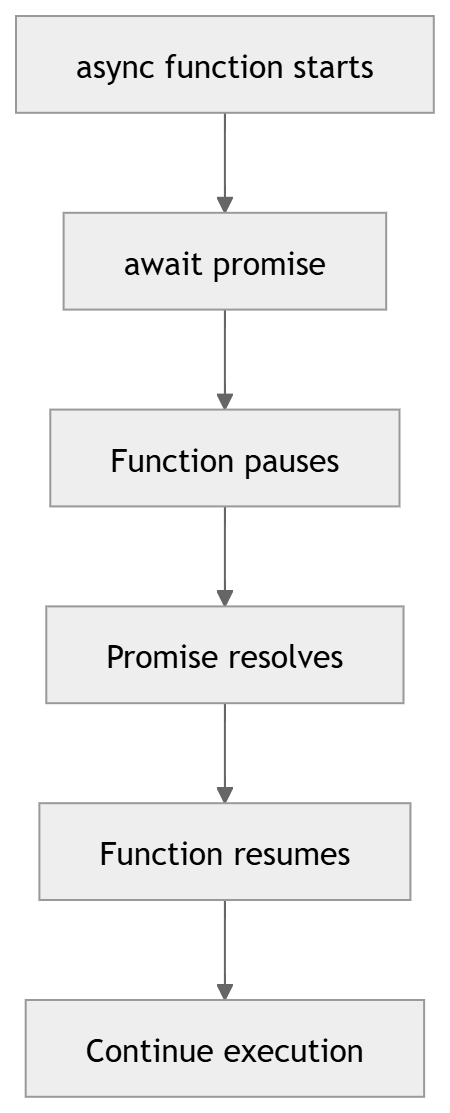
It pauses execution of the current async function until the promise resolves.
Example
async function showMessage() {
  console.log("Before wait");
  await new Promise((resolve) => setTimeout(resolve, 2000));
  console.log("After wait");
}
This pauses the function, but not the whole program.
Important detail
await is not the same as blocking the thread. It is more like saying, “Pause this function here and resume it later when the promise finishes.”
Async/await flow diagram
Error handling with async/await
One of the nicest features of async/await is that error handling becomes very familiar.
Using try/catch
async function loadProfile() {
  try {
    const response = await fetch("/api/profile");
    if (!response.ok) {
      throw new Error("Request failed");
    }

    const profile = await response.json();
    console.log(profile);
  } catch (error) {
    console.error("Unable to load profile:", error.message);
  }
}
This looks a lot like synchronous error handling, which makes it easier for many developers to reason about.
Table: error handling styles
Style | Error handling method | Readability |
|---|---|---|
Callbacks | Error-first callback arguments | Medium to low |
Promises |
| Good |
Async/await |
| Very good |
Sequential vs parallel execution
One of the most common mistakes in async JavaScript is writing tasks sequentially when they could run in parallel.
Sequential example
async function loadSequentially() {
  const user = await fetchUser();
  const orders = await fetchOrders(user.id);
  const settings = await fetchSettings(user.id);

  return { user, orders, settings };
}
This is fine when each step depends on the previous one. But if tasks are independent, sequential execution wastes time.
Parallel example
async function loadInParallel() {
  const [user, orders, settings] = await Promise.all([
    fetchUser(),
    fetchOrders(),
    fetchSettings()
  ]);

  return { user, orders, settings };
}
The parallel version usually finishes faster because all requests start together.
Schema diagram: sequential vs parallel

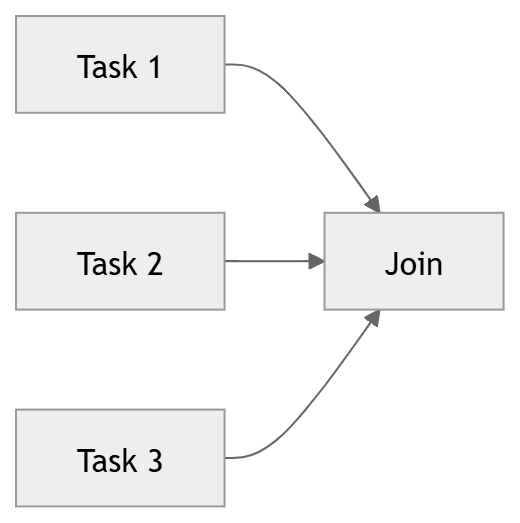
Table: when to use which
Scenario | Best choice |
|---|---|
Task B depends on Task A | Sequential |
Tasks are independent | Parallel |
Need the first successful result |
|
Need every result, success or failure |
|
Real-world example: loading user dashboard data
Imagine a dashboard that needs the user profile, notifications, and recent activity.
Using promises
Promise.all([
  fetch("/api/user").then((r) => r.json()),
  fetch("/api/notifications").then((r) => r.json()),
  fetch("/api/activity").then((r) => r.json())
])
  .then(([user, notifications, activity]) => {
    console.log(user, notifications, activity);
  })
  .catch((error) => {
    console.error("Dashboard failed:", error);
  });
Using async/await
async function loadDashboard() {
  try {
    const [userRes, notificationsRes, activityRes] = await Promise.all([
      fetch("/api/user"),
      fetch("/api/notifications"),
      fetch("/api/activity")
    ]);

    const user = await userRes.json();
    const notifications = await notificationsRes.json();
    const activity = await activityRes.json();

    return { user, notifications, activity };
  } catch (error) {
    console.error("Dashboard failed:", error);
    throw error;
  }
}
The second version is often easier to maintain in a real project.
Mixing async styles
In real codebases, you will often see callbacks, promises, and async/await together.
That is normal.
For example:
button.addEventListener("click", async () => {
  try {
    const response = await fetch("/api/save");
    const result = await response.json();
    console.log(result);
  } catch (error) {
    console.error(error);
  }
});
Here the event listener is a callback, but the inside uses async/await. That is a healthy and common pattern.
Common mistakes in async JavaScript
Async JavaScript is powerful, but it is easy to make subtle mistakes.
1. Forgetting to return a promise chain value
fetchUser()
  .then((user) => {
    fetchOrders(user.id); // missing return
  })
  .then((orders) => {
    console.log(orders); // undefined
  });
Correct version:
fetchUser()
  .then((user) => {
    return fetchOrders(user.id);
  })
  .then((orders) => {
    console.log(orders);
  });
2. Using await outside an async function
const data = await fetch("/api/data"); // syntax error in many contexts
Correct version:
async function getData() {
  const data = await fetch("/api/data");
  return data;
}
3. Running sequential awaits when parallel is better
const a = await taskA();
const b = await taskB();
const c = await taskC();
If these are independent, use Promise.all().
4. Swallowing errors silently
try {
  await doSomething();
} catch (error) {
  // nothing here
}
Silent failure makes debugging much harder.
5. Forgetting response.ok
A fetch request can resolve successfully even when the HTTP response is an error status like 404 or 500.
const response = await fetch("/api/item");

if (!response.ok) {
  throw new Error("Server returned an error");
}
Fetch API and async/await
The Fetch API is one of the most common examples of promises in JavaScript.
Basic fetch example
fetch("https://api.example.com/users")
  .then((response) => response.json())
  .then((users) => console.log(users))
  .catch((error) => console.error(error));
Async/await version
async function getUsers() {
  try {
    const response = await fetch("https://api.example.com/users");

    if (!response.ok) {
      throw new Error("Failed to fetch users");
    }

    const users = await response.json();
    console.log(users);
  } catch (error) {
    console.error("Error loading users:", error);
  }
}
This is one of the best examples of why async/await became the preferred style for many teams.
Building your own promise-based utility
Let us create a small delay helper.
function delay(ms) {
  return new Promise((resolve) => {
    setTimeout(resolve, ms);
  });
}
Use it:
async function demo() {
  console.log("Step 1");
  await delay(1000);
  console.log("Step 2");
}
This tiny helper becomes very useful in testing, animations, retries, and scripted workflows.
Retry logic with promises and async/await
Many async tasks should be retried if they fail temporarily.
Example
async function fetchWithRetry(url, retries = 3) {
  for (let attempt = 1; attempt <= retries; attempt++) {
    try {
      const response = await fetch(url);

      if (!response.ok) {
        throw new Error(`HTTP error: ${response.status}`);
      }

      return await response.json();
    } catch (error) {
      if (attempt === retries) {
        throw error;
      }
    }
  }
}
This pattern is extremely useful for unstable network conditions.
Timeout handling
Sometimes a request should not wait forever. You can add a timeout using Promise.race().
function timeout(ms) {
  return new Promise((_, reject) => {
    setTimeout(() => reject(new Error("Request timed out")), ms);
  });
}

async function fetchWithTimeout(url, ms = 5000) {
  return Promise.race([
    fetch(url),
    timeout(ms)
  ]);
}
This technique is common in production systems.
Async iteration
Working with arrays of async operations requires care.
Do not use forEach with await
This is a common bug:
users.forEach(async (user) => {
  await saveUser(user);
});
forEach does not wait for async callbacks.
Better alternatives
Sequential loop
for (const user of users) {
  await saveUser(user);
}
Parallel execution
await Promise.all(users.map((user) => saveUser(user)));
Table: iteration choices
Goal | Best pattern |
|---|---|
Process one at a time |
|
Process all at once |
|
Ignore completion order | Concurrent promises |
Preserve order and control | Sequential loop |
Callback vs promise vs async/await
This is the heart of the article. Each style is useful, but they serve different needs.
Callback example
readFile("notes.txt", "utf8", (err, data) => {
  if (err) {
    console.error(err);
    return;
  }

  console.log(data);
});
Promise example
readFilePromise("notes.txt")
  .then((data) => console.log(data))
  .catch((err) => console.error(err));
Async/await example
async function printFile() {
  try {
    const data = await readFilePromise("notes.txt");
    console.log(data);
  } catch (err) {
    console.error(err);
  }
}
Table: comparison of async styles
Feature | Callbacks | Promises | Async/Await |
|---|---|---|---|
Readability | Fair to poor | Good | Excellent |
Error handling | Manual, repetitive |
|
|
Nesting risk | High | Low | Low |
Chaining | Awkward | Natural | Natural |
Debugging | Harder | Better | Easier |
Modern preference | Less preferred | Very common | Most preferred |
When callbacks are still the best choice
There are cases where callbacks remain perfectly fine.
They are natural for:
event listeners,
stream handlers,
low-level APIs,
function hooks,
performance-sensitive internal libraries.
For example:
window.addEventListener("resize", () => {
  console.log("Window resized");
});
A callback is not bad by itself. The problem is not callbacks. The problem is uncontrolled nesting and poor structure.
When promises are the best choice
Promises are ideal when:
you need to represent future completion,
you want to compose tasks,
you need easier error propagation,
you want to run multiple tasks together,
you are writing library or API code.
Promises are also the base layer under async/await, so understanding them is essential.
When async/await is the best choice
Async/await is ideal when:
code reads like a sequence of steps,
error handling should be simple,
you want maintainable business logic,
your team prefers straightforward control flow,
you are writing application code rather than low-level abstractions.
For most modern application code, async/await is the default choice.
Practical architecture: choosing the right tool
Table: choosing the async pattern
Situation | Recommendation |
|---|---|
UI event handling | Callback |
Chaining multiple dependent operations | Promise or async/await |
Fetching remote data | Async/await |
Writing reusable async utilities | Promise |
Handling multiple independent tasks |
|
Responding to user input over time | Callback |
Complex workflows | Async/await |
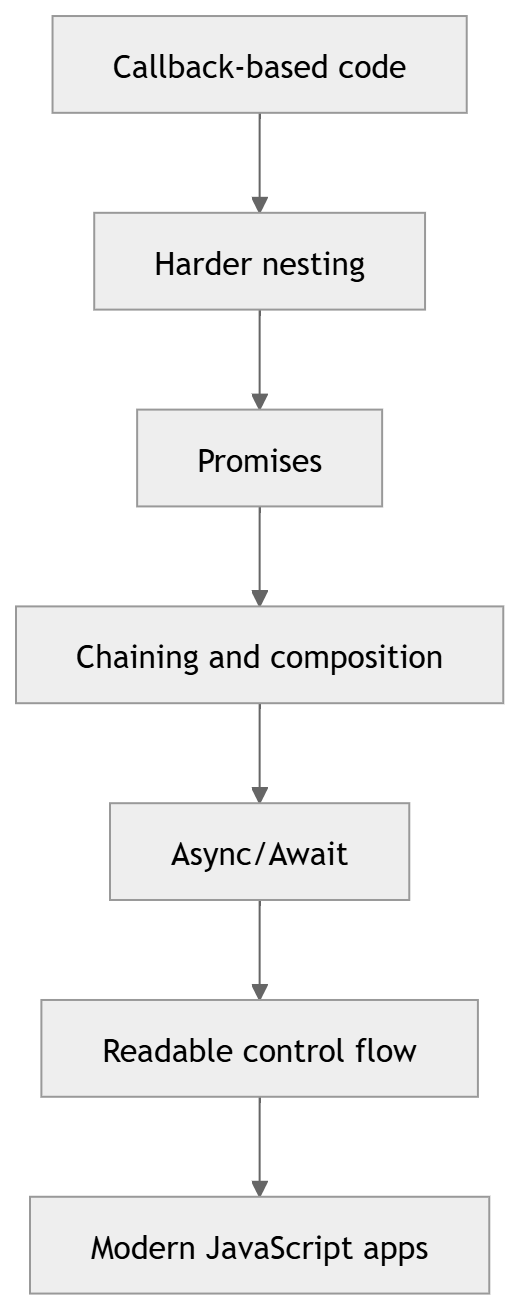
Schema diagram: evolution of async JavaScript

The evolution did not erase the previous tools. It gave JavaScript better options for different kinds of work.
A deeper mental model
Here is the simplest useful mental model:
A callback says, “When you are done, call this function.”
A promise says, “Here is a future result. I will tell you when it is ready.”
Async/await says, “Let me write promise-based code in a style that looks synchronous.”
That is the entire story in one sentence for each approach.
Example: building a mini workflow
Let us say you want to:
load a user,
load their orders,
calculate a summary,
display the result.
Callback version
loadUser(1, (err, user) => {
  if (err) return console.error(err);

  loadOrders(user.id, (err, orders) => {
    if (err) return console.error(err);

    calculateSummary(orders, (err, summary) => {
      if (err) return console.error(err);

      display(summary);
    });
  });
});
Promise version
loadUser(1)
  .then((user) => loadOrders(user.id))
  .then((orders) => calculateSummary(orders))
  .then((summary) => display(summary))
  .catch((err) => console.error(err));
Async/await version
async function runWorkflow() {
  try {
    const user = await loadUser(1);
    const orders = await loadOrders(user.id);
    const summary = await calculateSummary(orders);
    display(summary);
  } catch (err) {
    console.error(err);
  }
}
The async/await version is the most readable for many developers.
How promise chaining avoids callback hell
Callback nesting increases indentation. Promise chaining keeps the flow flatter.
Bad nesting
step1((err, result1) => {
  step2(result1, (err, result2) => {
    step3(result2, (err, result3) => {
      step4(result3, (err, result4) => {
        console.log(result4);
      });
    });
  });
});
Better chaining
step1()
  .then(step2)
  .then(step3)
  .then(step4)
  .then(console.log)
  .catch(console.error);
Best readability
async function run() {
  try {
    const r1 = await step1();
    const r2 = await step2(r1);
    const r3 = await step3(r2);
    const r4 = await step4(r3);

    console.log(r4);
  } catch (error) {
    console.error(error);
  }
}
Top tips for writing clean async code
1. Keep async functions small
A long async function with many responsibilities becomes hard to debug. Split large workflows into helper functions.
2. Handle errors intentionally
Do not assume every promise will succeed. Plan for failures.
3. Use parallelism when tasks do not depend on each other
This can improve performance dramatically.
4. Prefer async/await for application logic
It improves readability and maintainability.
5. Understand promise behavior before mixing styles
Knowing how promises work helps you avoid subtle bugs.
6. Do not overuse await
Every await is a pause inside that async function. Sometimes that pause is necessary. Sometimes it is not.
7. Be careful with loops
Choose between sequential execution and concurrency on purpose.
A note on top-level await
Modern JavaScript modules support top-level await in some environments.
const response = await fetch("/api/config");
const config = await response.json();
This can be very convenient in module entry points, but it should be used carefully because it can affect startup timing and module loading behavior.
Common interview-style questions you should be able to answer
What is a callback?
A function passed to another function to be executed later.
What is a promise?
An object representing the eventual result of an async operation.
What does async do?
It makes a function return a promise automatically.
What does await do?
It pauses an async function until the promise settles.
What is callback hell?
Deeply nested callbacks that become hard to read and maintain.
Why use Promise.all()?
To run multiple independent promises in parallel and wait for them all.
Why use try/catch with async/await?
To handle promise rejections in a clean and familiar way.
A complete example from start to finish
Here is a small realistic example that uses modern async code.
function delay(ms) {
  return new Promise((resolve) => setTimeout(resolve, ms));
}

async function fetchUser() {
  await delay(500);
  return { id: 1, name: "Hassan" };
}

async function fetchNotifications(userId) {
  await delay(700);
  return [
    { id: 1, text: `Welcome user ${userId}` },
    { id: 2, text: "You have 3 new messages" }
  ];
}

async function loadApp() {
  try {
    console.log("Loading app...");

    const user = await fetchUser();
    const notifications = await fetchNotifications(user.id);

    console.log("User:", user);
    console.log("Notifications:", notifications);
  } catch (error) {
    console.error("App failed to load:", error);
  } finally {
    console.log("Loading complete");
  }
}

loadApp();
This example shows a full flow:
helper function,
async functions,
sequential awaits,
error handling,
cleanup in
finally.
A visual summary you can reuse in a blog post
Schema diagram: full async evolution
Schema diagram: execution model

Final comparison table
Feature | Callbacks | Promises | Async/Await |
|---|---|---|---|
Style | Old-school async | Composable future values | Synchronous-looking async |
Readability | Can degrade quickly | Better than callbacks | Best for most app code |
Error handling | Manual |
|
|
Composition | Harder | Strong | Strong |
Parallel work | Possible but awkward | Excellent | Excellent with |
Best for | Events, low-level APIs | Reusable async logic | Application workflows |
Conclusion
Async JavaScript is one of the most important parts of modern development. Callbacks were the beginning, and they still matter. Promises brought structure, cleaner composition, and better error handling. Async/await made asynchronous code feel much more natural to read and write.
The most important thing is not choosing one pattern forever. It is understanding how they relate to one another.
Callbacks are the foundation.
Promises are the bridge.
Async/await is the elegant interface on top.
Once you understand that relationship, async JavaScript stops feeling mysterious and starts feeling like a powerful set of tools you can combine with confidence.
If you are writing modern application code, async/await will probably be your default choice. If you are building reusable async abstractions or working with older APIs, promises and callbacks still matter a great deal. And if you understand the event loop, the microtask queue, and the behavior of promise chaining, you will be able to write async code that is not only correct, but also clean, fast, and easy to maintain.